

From CAD to Catalog , in one prompt.
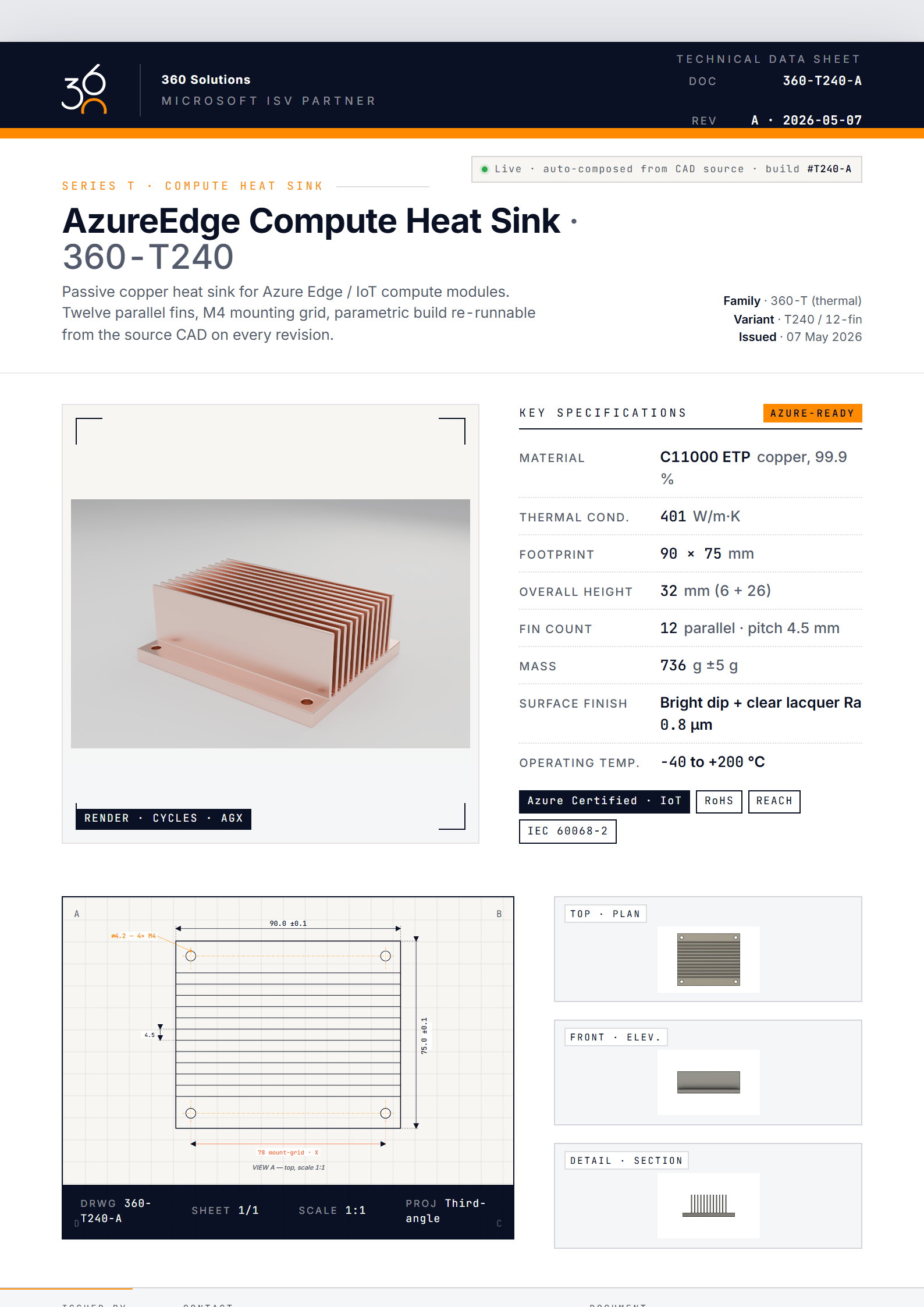
A heat sink (codename 360-T240) lives as 9 user parameters in Fusion 360. Claude — or any tool-calling LLM — drives an MCP, builds the geometry, exports the STL, hands off to Blender for the hero shot, and composes a print-ready spec sheet PDF. From CAD straight to catalog, no engineer needed after the prompt.
One agent, three apps, zero handoffs.
Claude is the orchestrator in this run. Fusion 360, Blender, and the layout renderer are each a small set of schema-validated MCP tools. Swap the orchestrator (Azure AI Foundry, OpenAI, or any other tool-calling LLM) and the rest of the pipeline doesn't change.
Claude reads the prompt
"Spec sheet for the new 360-T240 heat sink." Claude plans the build, picks the MCP tools, drives the rest.
Fusion 360 builds the part
9 user parameters, 17 sketches, 17 extrudes, one 192-edge fillet. Schema-validated tools — no freeform scripting.
Blender renders the hero
STL imported, brushed-aluminum shader, white-studio scene, Cycles GPU + AgX view transform. 96 samples, 14 s.
Spec sheet composes
Hero render + viewport captures + dimensioned drawing + parameter table → A4 PDF in your brand. Vector text, embedded images.
End-to-end, on a developer laptop, ≈ 28 seconds from prompt to PDF on disk.
Schema-validated tools, not freeform code.
Each MCP tool has a typed input schema and a typed return shape. The model can't pass garbage to Fusion's API — the bridge rejects it before a single adsk.* call fires. That's the guardrail an LLM cannot bypass.
The terminal alongside shows the actual tool calls Claude made to produce the spec sheet.
user> Generate the spec sheet for the new 360-T240
      heat sink. 12 fins, 5.5 mm pitch, M4 mounting.

// Claude plans the build, sets the parametric contract
▸ fusion-general.set_user_parameter ×9 — base_w, base_d, base_t, fin_count …
  → ✓ 9 user parameters created

// Geometry: 1 base + 12 fins (join) + 4 holes (cut)
▸ fusion-general.create_sketch + sketch_rectangle + extrude ×17
  → ✓ 1 body · "HeatSink" · vol 82.18 cm³ · mass 222 g

▸ fusion-general.fillet_all_edges { body: "HeatSink", radius: 0.05 }
  → ✓ 192 edges filleted · 0.5 mm break

// Capture viewports for the spec-sheet detail strip
▸ fusion-general.run_fusion_script { capture_views: [iso, top, front, side] }
  → ✓ 4 PNGs · "./renders/fusion_*.png"

▸ fusion-general.export_stl { refinement: "high" }
  → ✓ "360-T240.stl" · 53 252 verts · 3.1 MB

// Hero render in Blender — brushed aluminum studio scene
▸ blender.execute_blender_code {
    code: "import_stl(); apply('brushed_aluminum');
           studio_white(); cycles_render(96, AgX)"
  }
  → ✓ hero.png · 2400×1500 · 14.2s

// Compose 360 Solutions branded spec sheet
▸ spec-sheet.compose {
    template: "360-solutions/v1",
    part_id:  "360-T240",
    revision: "A"
  }
  → ✓ "360-T240_RevA.pdf" · 1 page · A4

assistant> Spec sheet ready. 28.3 s elapsed.One pipeline, your brand and product family.
The 360-T240 above is a real Fusion 360 model rendered in Blender, composed into a 360 Solutions branded spec sheet. The same pipeline drops onto your CAD library in two weeks — your brand, your product range, your spec schema.
Brand & layout
Logo, colour, typography, layout grid — all driven by a template you configure once. No code to change between brands.
Product family
Heat sinks today, hydraulic manifolds or cabinet hardware tomorrow. Each new family gets a Fusion template and a parameter contract. The agent does the rest.
Render style
Studio white, machined-shop floor, exploded view, ghosted internals. The Blender scene is just another input the agent picks per template.
Spec table schema
Material, finish, certification, packaging — define which fields appear and where. We pull from CAD parameters, ERP, or a YAML side-car.
Languages
Spec sheets in NL, FR, EN, DE — same source, localised labels and units. Useful when one part ships across BeNeLux and DACH.
Compliance & cert
EN 10204 certificates, RoHS / REACH attestations, PED categories. Bind to your QC system once; print on every sheet.
AI orchestrator
Claude today, Azure AI Foundry or OpenAI tomorrow. The MCP layer is provider-agnostic — any tool-calling LLM can drive the same pipeline. Plug-and-play swap, no rebuild.
Your CAD platform
Fusion 360, SolidWorks, Inventor, Rhino, Onshape, FreeCAD — most modern CAD has working MCP today. Anything else? A custom bridge build.
Want this for your catalog?
If you have a Fusion 360 (or SolidWorks, or Inventor) library and a sales team copy-pasting spec sheets from old PDFs — book a call. We'll have a working pipeline against your parts in two weeks. The spec sheet on this page was produced end-to-end through MCP — Claude in this demo, but Azure AI Foundry, OpenAI, or any tool-calling LLM works the same way.
Built on the open fusion-general MCP server.
Pair with blender-mcp for hero rendering.
Read the AI policy for what data leaves your tenant.